New folder
Create folders and move locally remembered shares into the right place.
 shareBySquare
An Explorer-style view for Platinum shares remembered in this browser: folders, search, favorites, trash, and link status in one place.
 My storage
 Local index
 Ready
Ready
Cloud turns remembered Platinum shares into a familiar file-manager surface without exposing decryption links through a server listing.
New folder
Create folders and move locally remembered shares into the right place.
 Search
Find a file by name, filter by type, and sort columns like in a desktop file manager.
 Favorites
Mark important shares, restore them from trash, or remove records you no longer need.
Status
Check whether a link is ready, expired, deleted, or needs attention before you copy it again.
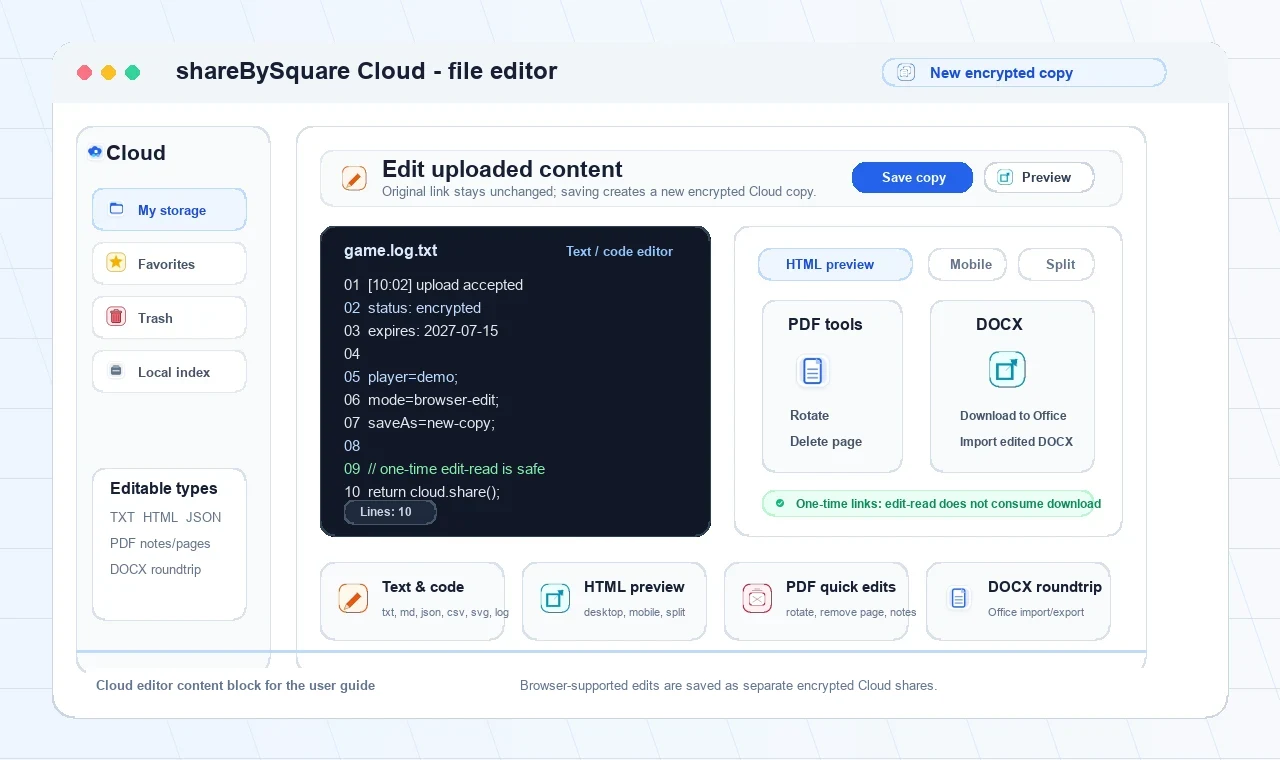
Cloud can open editable shares directly in the browser. Supported edits are saved as a new encrypted Cloud copy, so the original shared link keeps its current state.
 Text, code and data
Edit plain text, logs, Markdown, JSON, CSV, SVG and similar browser-readable files.
 HTML with live preview
Switch between code, split view, and desktop or mobile preview before saving a copy.
 PDF quick edits
Rotate pages, remove a page, or add a visible note when the browser PDF engine is available.
 DOCX and Office roundtrip
Preview simple DOCX text in the browser, or download to Office and import the edited DOCX back before saving.
Saving never overwrites the original share. One-time links open through safe edit-read when license ownership allows it, so editing does not consume the download.
Upload with Platinum, return to Cloud in this browser profile, then organize, copy, restore, or clean up the remembered link.
Choose any document, photo, archive, or media file from your device.
Manage locally remembered Platinum shares and encrypted Vault artifacts for this device.
Server files are encrypted. Decryption links and deletion keys are never listed by the server.
This view uses an encrypted local index. Published Vault artifacts do not yet replicate folders across devices or provide server recovery.
Start with a Platinum upload, then return to Cloud in this browser profile whenever you need to organize, copy, restore, or clean up a remembered share.